Download the OWC SSD FirmwarePlease read all instructions below carefully before proceeding for information that may affect your specific computer.It is always highly recommended that you backup your data. Your data must exist in multiple locations to be qualified as having a backup. Anytime a drive is being updated, upgraded or moved, there is a potential for data loss. This update is non-destructive. While OWC has updated several drives with no data loss, we strongly recommended backing up all data on the SSD before performing this update.
Intel based Mac. (Please see supported models to the right)
Wired USB Keyboard & Mouse
2GB or greater USB Flash Drive or Blank CD/DVD disc
OWC SSD (ompatible with all OWC Mercury and Aura models)
Fully compatible with machines utilizing OWC Data Doubler
Fully compatible with iMacs that have been upgraded through OWC's iMac upgrade service
Copy the three applications to the Desktop of your Mac. Each of these applications perform a different step in the update process.
Double click the "Step 1" application file on your desktop to prepare for the firmware update. Once this application has finished, click the "OK" button to quit out of it.
Restart your Mac. Note: You must restart your Mac at this point or the upgrade process will fail.
After your Mac has restarted, double click the "Step 2" application file on your desktop to perform the firmware update.
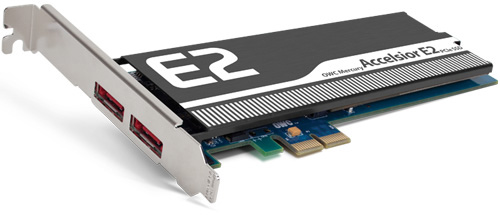
Click the "Update Firmware" button in the Accelsior Updater application. The firmware in your Accelsior card will then be updated. After being updated, the application will verify that the firmware was written correctly.
If you have more than one Accelsior card to update, select each additional card using the "Targeting" menu and then click the "Updating Firmware" button. The updater will update the firmware on the selected card and then verify that the firmware has been updated correctly.
Once the firmware has been updated, click the "Quit" button to quick the Accelsior Updater application.
Double click the "Step 3" application file on your desktop to restore your Accelsior card to normal operating mode. Once this application has finished, click the "OK" button to quit out of it.
Restart your Mac. You must restart your Mac at this point or you will not be able to access the volumes on your Accelsior card.
If you need more information or help with the update process, please contact OWC Customer Support at: (800) 275-4576
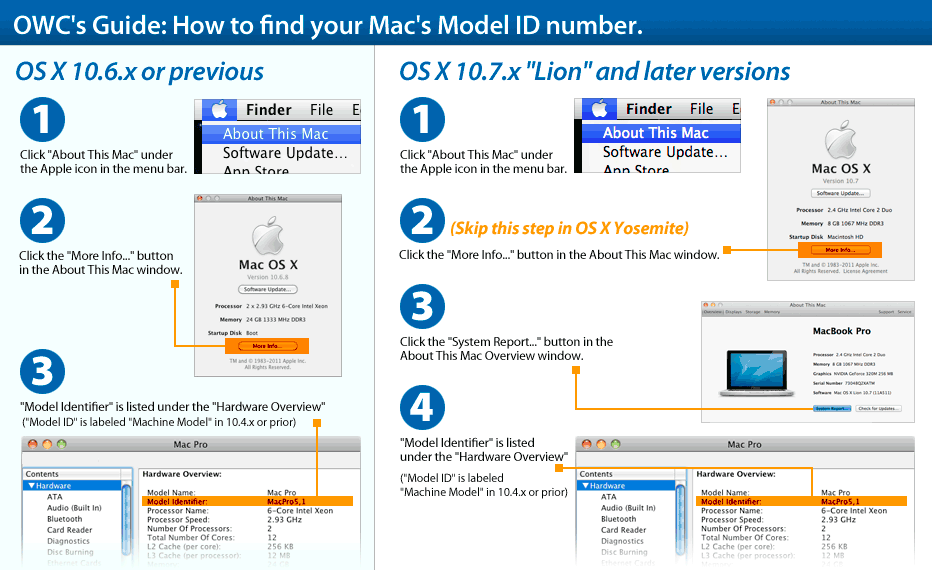
Please ensure your Mac is compatible with this OWC SSD Firmware Updater by verifying your Model ID is listed below. How to find your machine's model ID.
Mac Pro 2008 - 2012
Mac OS 10.9 - 10.12.
Any Mac Pro 1,1 - 5, 1"
Aura, Data Doubler, Mercury Aura, Mercury Electra and Mercury EXTREME are trademarks of New Concepts Development Corporation, registered in the U.S. Patent and Trademark Office. iMac, Mac Pro, MacBook, MacBook Air, MacBook Pro, and Retina are trademarks of Apple Inc., registered in the U.S. and other countries. Other marks may be the trademark or registered trademark property of their owners.


 1-800-275-4576

 OWC Mercury Accelsior E2 Firmware Updater